A LITTLE LESS TO KEEP IN YOUR HEAD

Work freely.
Trace remembers.

All those tabs. That half-finished thought.
The reason you chose one thing over another.
A clearer way back to what matters.

Get early access
Starting with macOS
N A thought worth keeping ···
PROJECT NOTES

Keep the free tier.
Give people room.

Something to come back to.

● ● ●research / saved reference
THE DETAIL THAT CLICKED

A different way
to look at it.

A DECISION, NOT LOST

“Let’s keep the free tier.
Give people room to try it.”

N Pricing notes
✓ Next time you’re here

Validate the pricing proposal

Compare the saved references

Your work leaves a thread.Illustrative project
FOLLOW IT

How Trace turns scattered work into a project you can return to

  1. 1 Activity

    Your day happens in pieces.

    A tab at nine. A note at eleven. A message you meant to answer. Work scatters across a dozen places, and none of them remembers the others.

  2. 2 Context

    Then the pieces find each other.

    Trace notices what belongs together: the notes, the research and the draft. Then it quietly ties them into one project.

  3. 3 Memory

    What mattered, kept.

    The decision and the thinking behind it stay with the project, with the original source one click away.

  4. 4 Continuity

    Come back. Carry on.

    Tomorrow morning, or after a long weekend, open the project and you are already back in it. No digging, no rebuilding.

Skip walkthrough

Work is rarely tidy.

People, papers, half-made plans. Trace keeps the thread through the blur.

Oh, right.
There it is.

One project, three ways back in.
Pick a question and see.

Pricing launch PROJECT MEMORY
THE DECISION

Keep the free tier.
Usage-based pricing for teams.

The decision, and the note it came from.

Illustrative example

A source you can
actually open.

Go from a decision to the exact words behind it. Try the highlighted button.

Every decision links back to where it came from. Select the highlighted button in the screenshot.
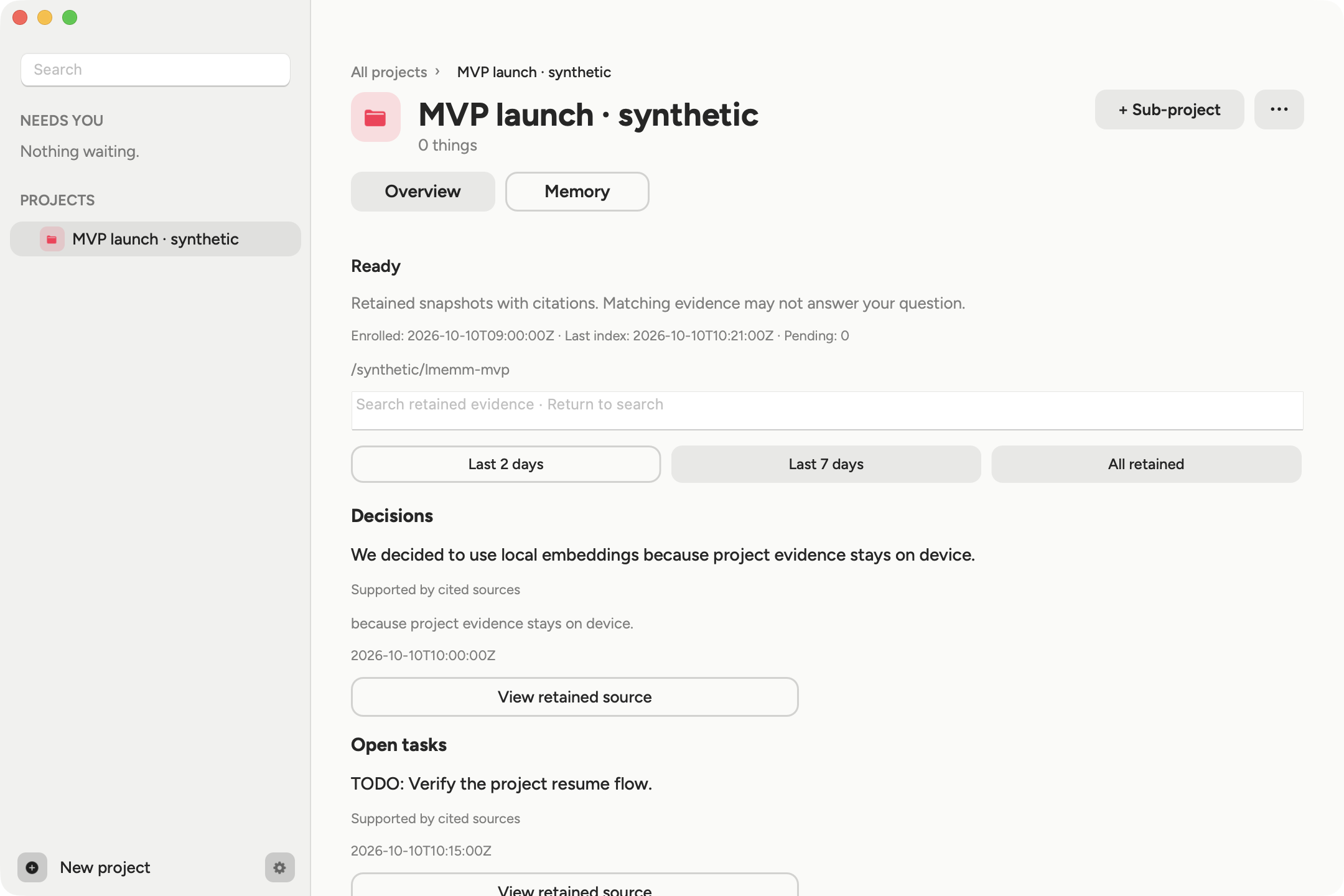
Trace / project memory01 / 02
Actual earlier app build showing a synthetic project decision and a View retained source button
Real app captures from an earlier build, with made-up dataGuided walkthrough

THE CONCEPT FILM

See Trace
in motion.

A little less to keep in your head.
The idea behind Trace, in 43 seconds.

A CLEARER PICTURE

Your memory.
Your say.

Screen access is a big ask. Here’s what Trace uses it for, what it keeps, and when anything leaves your Mac.

Try the controls. This is a preview; it doesn’t access your screen, microphone, or apps.

traceCONTROL PREVIEW
Preview running
N
NOTES · EXAMPLE

Pricing launch

Keep the free tier so people can try it.

ON THIS MAC
Example app selection2 apps selected in this preview

Read the moment. Keep the context.

The latest beta reads individual images of an allowed foreground window to recognize your work. It does not record continuous screen video.

Why it helps
Recognize the work you had open, so you can return to it.
What stays
Retained text and some small image previews in local app files.
What leaves
Normal capture is processed on your Mac, without sending the frames to a cloud AI.
Read the beta capture details +
The latest beta captures only the selected window. If any Brave incognito window is open, reading from Brave stops until all its private windows close. An unknown browser privacy state also stops reading. Safari and browsers whose privacy mode cannot be verified are currently excluded, including normal windows. Most window images are processed in memory; some are kept as small previews. Those previews normally expire after seven days, except for pinned items or items with open notes. Extracted text and notes have separate retention. If you enable the optional input timeline, it can retain full-size frames for up to 24 hours. Current beta files are not encrypted by Trace. You can pause capture, inspect saved items and delete retained data in the app.

BEFORE YOU JOIN
What does early access look like?+

A small, hands-on macOS beta. Try Trace in your day, share what helps and what gets in the way, and help shape what comes next.

Can I use it with my team?+

Early access starts with one person on one Mac. Shared team memory is not available yet.

Less to remember.
More room to think.

For your work, your studies,
and the projects you’re not done with yet.

Visual preview · waitlist registration opens soon.

Starting with macOS

Trace concept film · sound on your terms.

ILLUSTRATIVE EXAMPLE

Pricing notes

“Keep the free tier so people can try it. Explore usage-based pricing for team features. Next: validate the pricing proposal.”

Every answer points back to the note it came from. This example contains no personal data.